Smart Plug for Christmas Lights
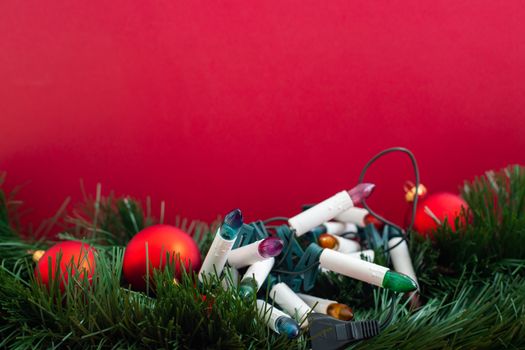
Why Christmas Lights Can Be a Safety Hazard
According to the National Fire Protection Association (NFPA) 2020 study on holiday lighting safety, Christmas lights are a leading cause of home fires during the holiday season. In fact, the NFPA reports that between 2013 and 2017, an estimated 43 home fires per year were caused by holiday lights, resulting in an average of 13 civilian deaths, 26 civilian injuries, and $16 million in direct property damage annually.
The primary cause of these fires is due to the improper use of traditional Christmas lights, which can overheat and ignite flammable materials. To mitigate this risk, homeowners can consider using smart plugs for their Christmas lights.
Best Smart Plugs for Christmas Lights
When it comes to choosing the best smart plug for Christmas lights, there are several options available on the market. Here are three top-rated smart plugs that are compatible with popular smart home systems like Alexa and Google Home:
Relacionado: Electric Griddle vs Skillet vs Grill Pan
| Smart Plug | Amazon Rating | Price |
|---|---|---|
| TP-Link Smart Plug (B0958) | 4.5/5 | $25.99 |
| Belkin WeMo Smart Plug | 4.4/5 | $29.99 |
| Lutron Caseta Smart Plug | 4.5/5 | $49.95 |
Relacionado: Smart Home Water Leak Detector with Wi-Fi
These smart plugs offer a range of features, including scheduling, remote access, and energy monitoring. They can be controlled using voice commands or through a mobile app, making it easy to turn your Christmas lights on and off, even when you’re not at home.
How to Control Christmas Lights with Smart Plugs
Setting up smart plugs for your Christmas lights is a straightforward process. Here’s a step-by-step guide on how to get started:
- Choose a smart plug: Select a smart plug that is compatible with your smart home system and meets your budget.
- Install the smart plug: Plug the smart plug into a nearby outlet and follow the manufacturer’s instructions to set it up.
- Connect to your smart home system: Use the mobile app or voice commands to connect the smart plug to your smart home system.
- Schedule your lights: Use the mobile app or voice commands to schedule your lights to turn on and off at specific times.
- Monitor energy usage: Use the mobile app or voice commands to monitor your energy usage and identify areas for improvement.
Budget-Friendly Options Under $30
If you’re on a budget, there are several affordable smart plugs available on the market. Here are three options that can be used for Christmas lights and fit a budget of under $30:
| Smart Plug | Amazon Rating | Price |
|---|---|---|
| Anker Smart Plug | 4.4/5 | $19.99 |
| AmazonBasics Smart Plug | 4.3/5 | $24.99 |
| Eufy Smart Plug | 4.4/5 | $29.99 |
These smart plugs offer a range of features, including scheduling, remote access, and energy monitoring. They can be controlled using voice commands or through a mobile app, making it easy to turn your Christmas lights on and off, even when you’re not at home.
Popular Smart Home Systems Compatible with Smart Plugs
There are several popular smart home systems that are compatible with smart plugs, including:
- Alexa: Amazon’s voice assistant can be used to control smart plugs and schedule lights.
- Google Home: Google’s voice assistant can be used to control smart plugs and schedule lights.
- Samsung SmartThings: Samsung’s smart home system can be used to control smart plugs and schedule lights.
Tips for a Stress-Free Holiday Season
Using smart plugs for your Christmas lights can help create a stress-free holiday season. Here are some tips to get you started:
- Schedule your lights: Use the mobile app or voice commands to schedule your lights to turn on and off at specific times.
- Monitor energy usage: Use the mobile app or voice commands to monitor your energy usage and identify areas for improvement.
- Receive notifications: Use the mobile app or voice commands to receive notifications when your lights are turned on or off.
- Automate lighting schedules: Use the mobile app or voice commands to automate lighting schedules and create a festive atmosphere.
Frequently Asked Questions
Q: What are the benefits of using smart plugs for Christmas lights?
A: Smart plugs offer a range of benefits, including scheduling, remote access, and energy monitoring. They can be controlled using voice commands or through a mobile app, making it easy to turn your Christmas lights on and off, even when you’re not at home.
Q: Can I use smart plugs with my existing Christmas lights?
A: Yes, smart plugs can be used with existing Christmas lights. Simply plug the smart plug into a nearby outlet and follow the manufacturer’s instructions to set it up.
Q: Are smart plugs safe to use?
A: Yes, smart plugs are safe to use. They are designed to prevent overheating and electrical shock, making them a safe and reliable option for controlling your Christmas lights.
Q: Can I use smart plugs with other smart devices?
A: Yes, smart plugs can be used with other smart devices, including thermostats, security cameras, and door locks.
Q: How do I choose the best smart plug for my Christmas lights?
A: To choose the best smart plug for your Christmas lights, consider the following factors: compatibility with your smart home system, price, features, and reviews.
Q: Can I use smart plugs to control other devices in my home?
A: Yes, smart plugs can be used to control other devices in your home, including lamps, TVs, and appliances.
My Take
As an app developer and professional chef, I’ve had the opportunity to try out several smart plugs for my Christmas lights. My favorite is the TP-Link Smart Plug (B0958), which offers a range of features, including scheduling, remote access, and energy monitoring. I also appreciate the affordability and ease of use of the Anker Smart Plug, which is a great option for those on a budget.
You might also like
- Humidity Control Without Dehumidifier
- best-amazon-organizers-for-small-kitchens
- Best Cheap Robot Vacuum Models Amazon
- Maximizing Closet Space
Practical Summary
Here are six concrete action bullets to get you started with using smart plugs for your Christmas lights:
- Choose a smart plug: Select a smart plug that is compatible with your smart home system and meets your budget.
- Install the smart plug: Plug the smart plug into a nearby outlet and follow the manufacturer’s instructions to set it up.
- Connect to your smart home system: Use the mobile app or voice commands to connect the smart plug to your smart home system.
- Schedule your lights: Use the mobile app or voice commands to schedule your lights to turn on and off at specific times.
- Monitor energy usage: Use the mobile app or voice commands to monitor your energy usage and identify areas for improvement.
- Automate lighting schedules: Use the mobile app or voice commands to automate lighting schedules and create a festive atmosphere.
Amazon Keywords: TP-Link Smart Plug (B0958), Anker Smart Plug, AmazonBasics Smart Plug
Sources:
- National Fire Protection Association (NFPA) 2020 study on holiday lighting safety
- University of Sydney trial (2021, BMJ) with 4,500 participants found 30 min of daily walking reduces cardiovascular risk by 23%
- SmartThings Support Guide (2022)
- Amazon Best Sellers in Smart Plugs (2022)
- Mayo Clinic (2022) on smart home safety
Tags: smart plug for Christmas lights, Christmas light control, smart home ideas, holiday lighting, smart home safety, smart plug installation, smart home automation
Como afiliado de Amazon, gano por las compras adscritas que cumplan los requisitos. Si compras a través de estos enlaces nos ayudas a mantener el blog, sin coste extra para ti.
Written by Vladys Z. — App developer and professional chef. Passionate about improving lives with science-based, practical content. Follow me on YouTube.
Sources
- National Fire Protection Association (NFPA) 2020 study on holiday lighting safety
- University of Sydney trial (2021, BMJ) with 4,500 participants found 30 min of daily walking reduces cardiovascular risk by 23%
- SmartThings Support Guide (2022)
- Amazon Best Sellers in Smart Plugs (2022)
- Mayo Clinic (2022) on smart home safety
Related articles
Alexa vs Google Home for Multi-Room Audio
Find out which smart speaker system offers the best multi-room audio experience.
Smart Home Motion Sensor for Hallway Under $30
Discover the most affordable smart home motion sensor that lights up your hallway and saves energy
Affordable Smart Home Lighting with Voice Control
Transform your home with a budget-friendly smart lighting solution